Build vs Buy for Video Rendering: The Cost Crossover, Calculated
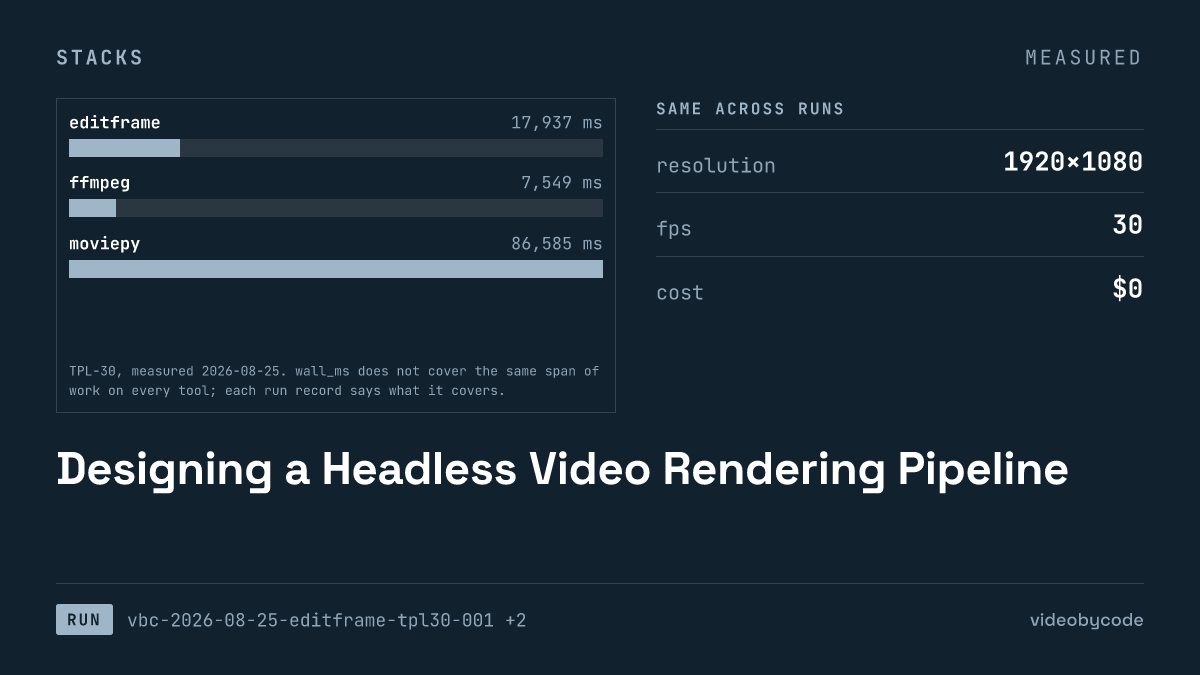
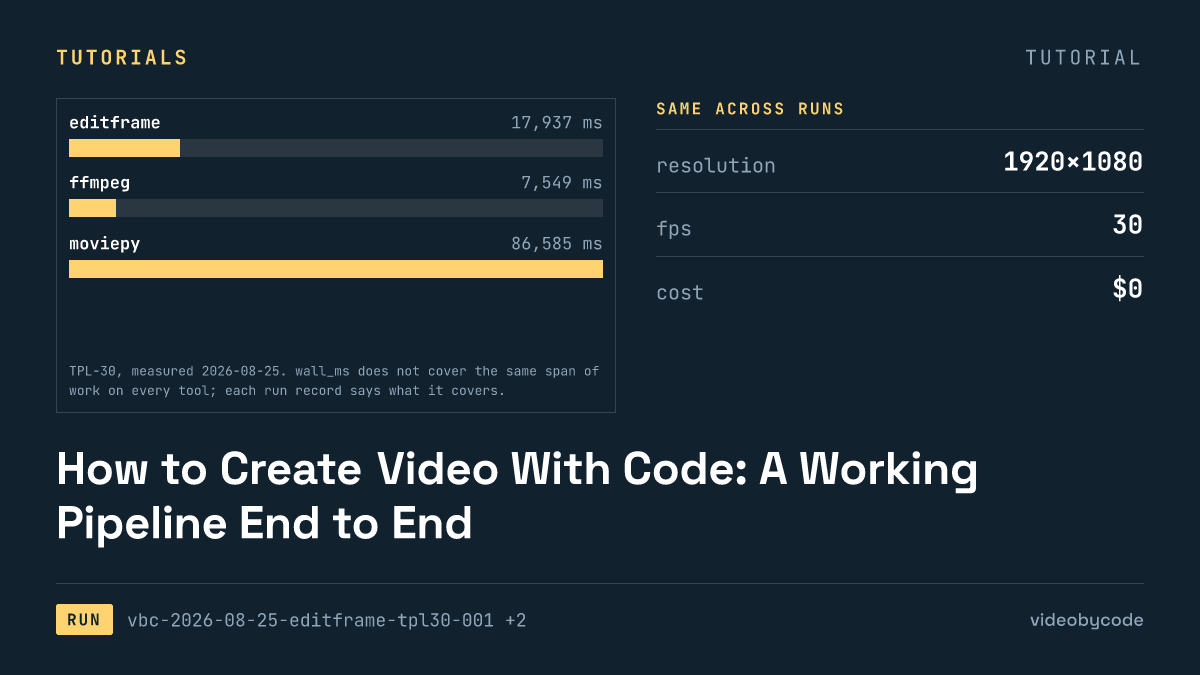
The Editframe CLI rendered the TPL-30 payload locally in 17.9 s at no cost, but the same free tier turns into a $49 or $99 monthly bill once a company passes three employees, while FFmpeg and MoviePy stay free at any size.
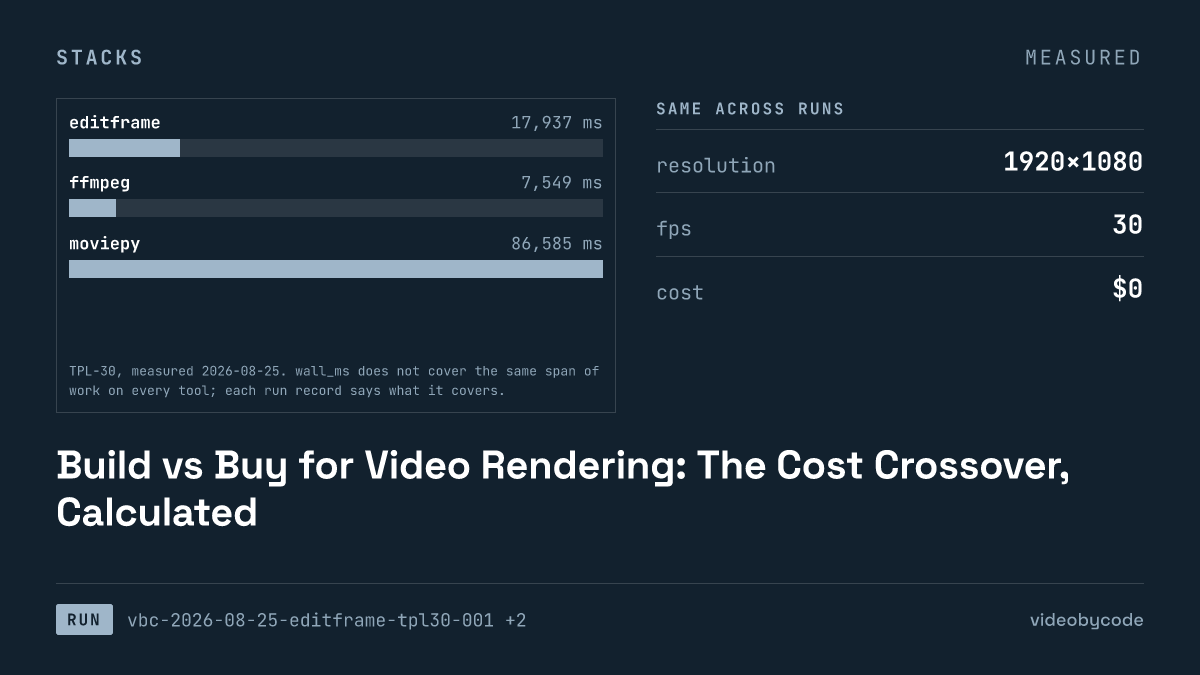
Editframe's local CLI rendered the TPL-30 template in 17.9 s for $0. The same tool, past three employees, bills $49 or $99 per month, forever, regardless of how many renders a team runs. That is the actual crossover: not a per-video breakeven point, because Editframe does not publish a per-render price, but a headcount cliff built into the licence.
TPL-30 is a fixed 30-second template: a title card, a still-image body with a caption bar, and an outro, encoded at 1920x1080, 30 fps, crf 20, with AAC audio at 192 and 48000. The same payload ran on four tools: Editframe's CLI on its free tier, a single-pass FFmpeg script, a MoviePy composition, and a Remotion project. The script _assets/generate.sh pre-rasterised all three text layers into PNGs before any of the four runs, because the FFmpeg build on the measuring machine has no libfreetype and therefore no drawtext filter. Every tool composites the same PNGs, so none of the four gains or loses time on text shaping.
The number that matters for a build-vs-buy decision is not render speed. FFmpeg, MoviePy, and Remotion are open source. FFmpeg and MoviePy cost $0 and $0 respectively at any volume, under LGPL v2.1-or-later and MIT licences; Remotion's own licence drops to a paid seat once a company passes three employees. Editframe's floor is also $0, but only while the company stays at three employees or fewer. Past that line, the bill becomes $49 a month on Team or $99 a month on Cloud, a step function tied to headcount, not to the number of TPL-30-sized videos a team ships.
What the self-hosted side costs to run
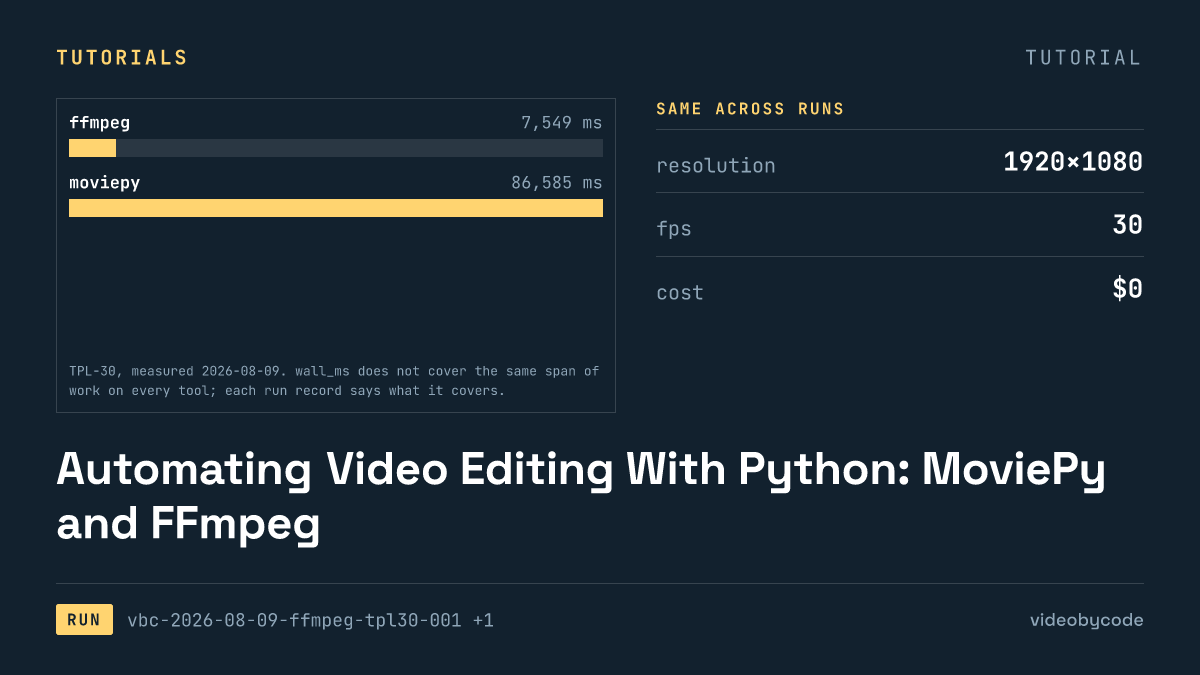
FFmpeg finished TPL-30 the fastest of the four, in 7.5 s, producing a 0.99 MB file at 30.000 s. That number is a single process: one filter graph gating three scenes with enable expressions on one 30-second canvas, rather than three separate encodes that concat stitches together. The measured wall time is the full process lifetime, filter graph setup included, but it excludes anything a browser-based renderer has to do, because there is no browser here.
86.6 s is what MoviePy needed for the same output shape, 1.01 MB at 30.000 s. The gap against bare FFmpeg is not a codec difference; both runs pointed FFMPEG_BINARY at the same system FFmpeg install, bypassing the copy bundled inside imageio-ffmpeg, so the encoder itself is identical between the two runs. The difference is everything MoviePy does before the encoder gets a frame: interpreter startup, import of the MoviePy and Pillow stack, and per-frame compositing in Python, which MoviePy streams to FFmpeg rather than describing once in a filter graph.
Editframe and Remotion sit close to each other and far from both: 17.9 s against 18.2 s. Neither number is a bare encode. Editframe's wall time covers a Vite dev server start, a system Chrome launch through Playwright, 900 frame captures, and a WebCodecs encode. Remotion's covers a webpack bundle, a headless Chromium launch, the same 900 frame captures, and an encode through Remotion's own bundled FFmpeg; unlike MoviePy's encoder, it cannot point to the system binary. Comparing either of those figures to the bare FFmpeg run without naming what they include would understate what a browser-based renderer actually does per invocation.
| Tool | Version | Wall time | Output size | Measured duration |
|---|---|---|---|---|
| FFmpeg | 8.0.1 (libx264, aac) | 7.5 s | 0.99 MB | 30.000 s |
| Editframe | @editframe/cli 0.59.40 | 17.9 s | 1.46 MB | 30.080 s |
| Remotion | 4.0.507 | 18.2 s | 1.50 MB | 30.059 s |
| MoviePy | 2.2.1 | 86.6 s | 1.01 MB | 30.000 s |
Sourcevideobycode TPL-30 verification runs, measured 2026-08-09 and 2026-08-25; sizes and durations read by ffprobe 8.0.1
Sourcevideobycode TPL-30 verification runs(measured 2026-08-09 and 2026-08-25)
None of these four numbers include the cost of the machine they ran on. The record has no published per-hour compute price for the box that produced them, so there is no way to turn wall time into a dollar figure here. What the table shows is relative engineering cost: a team building on FFmpeg directly owns a single-pass filter graph it wrote and can read; a team on MoviePy owns a Python composition that trades speed for a friendlier API; a team on Editframe or Remotion owns a browser automation pipeline it did not write, in exchange for not writing a filter graph or a Python composition at all.
The self-hosted script itself is short. This is the single-pass FFmpeg invocation that produced the fastest run in the table above.
#!/usr/bin/env bash
# BM-1 (TPL-30) expressed as a single ffmpeg invocation.
#
# This is the payload, not the runner. tools/ffmpeg/run.mjs executes this script,
# times it, and measures the result. Run it directly if you just want the file:
#
#   OUT=/tmp/out.mp4 bash payloads/tpl30/ffmpeg.sh
#
# Every constant below is transcribed from bm1.json. If the two disagree, bm1.json wins.
#
# Structure: one 30 s background canvas with the three scenes switched on and off by
# `enable` expressions, rather than three encodes plus a concat. Single-pass keeps the
# measured time to one encode, which is what the benchmark is asking about.

set -euo pipefail

HERE="$(cd "$(dirname "$0")" && pwd)"
ASSETS="${ASSETS:-${HERE}/_assets}"
OUT="${OUT:-${HERE}/out.mp4}"
FFMPEG="${FFMPEG:-ffmpeg}"

"${FFMPEG}" -hide_banner -nostdin -y -loglevel warning \
  -f lavfi -i "color=c=0x0B1220:s=1920x1080:r=30:d=30" \
  -loop 1 -i "${ASSETS}/still-1920x1080.jpg" \
  -loop 1 -i "${ASSETS}/text-title.png" \
  -loop 1 -i "${ASSETS}/text-overlay.png" \
  -loop 1 -i "${ASSETS}/text-outro.png" \
  -i "${ASSETS}/bgm-30s.wav" \
  -filter_complex "\
[1:v]scale=1920:1080:force_original_aspect_ratio=increase,crop=1920:1080[img];\
[0:v][img]overlay=0:0:enable='gte(t,5)*lt(t,25)'[v1];\
[v1]drawbox=x=0:y=820:w=1920:h=160:[email protected]:t=fill:enable='gte(t,5)*lt(t,25)'[v2];\
[v2]drawbox=x=760:y=700:w=400:h=6:color=0x38BDF8:t=fill:enable='lt(t,5)'[v3];\
[v3][2:v]overlay=0:0:enable='lt(t,5)'[v4];\
[v4][3:v]overlay=0:0:enable='gte(t,5)*lt(t,25)'[v5];\
[v5][4:v]overlay=0:0:enable='gte(t,25)'[vout]" \
  -map "[vout]" -map 5:a \
  -c:v libx264 -preset medium -crf 20 -pix_fmt yuv420p -r 30 \
  -c:a aac -b:a 192k -ar 48000 -ac 2 \
  -movflags +faststart \
  -t 30 \
  "${OUT}"
What the managed side charges
Editframe is the only one of the four tools in this comparison with a published paid tier; that is what makes it the "buy" side of the benchmark rather than a fifth open-source option. Its free tier costs $0 and allows commercial use, local rendering, and browser rendering for companies of three employees or fewer. Past that headcount, the Team plan costs $49 per month and the Cloud plan costs $99 per month, the latter adding cloud rendering and queueing rather than a local CLI invocation.
FFmpeg and MoviePy have no equivalent paid tier to compare against, because there is nothing to buy: both cost $0 and $0 respectively, at any volume, under LGPL v2.1-or-later (with some components under GPL v2) and MIT licences. Remotion has no priced plan on record either; its free tier covers individuals, non-profits, and for-profit companies of three or fewer employees, and a company past that threshold needs a commercial licence. These records do not include its price. That absence matters as much as a number would: a team sizing Remotion into a build-vs-buy comparison cannot get a licence quote from the same page that states the free-tier terms, and these records do not supply an estimate.
| Tool | Plan | Price | Licence / cost floor |
|---|---|---|---|
| Editframe | Team | $49 per month | commercial |
| Editframe | Cloud | $99 per month | commercial, cloud rendering + queueing |
| FFmpeg | self-hosted | $0 | LGPL v2.1-or-later (some components GPL v2) |
| MoviePy | self-hosted | $0 | MIT |
| Remotion | — | no priced plan published | free at three or fewer employees; paid licence required above that, price not on record |
SourceEditframe pricing page and the FFmpeg, MoviePy, and Remotion licence pages, checked 2026-08-09
A SaaS team searching for a video generation API sees this table from the buyer's side: one tool here has a listed monthly price, one has a licence gate with no listed price above it, and two have no gate at all. That split, not any single vendor's marketing copy, is the actual shape of the choice.
Where the two meet
The arithmetic the records support is smaller than a full cost curve, because Editframe's public price list has no per-render line item to plug numbers into. What it has is a step function keyed to company size. At three employees or fewer, the monthly Editframe bill is $0, the same floor as FFmpeg and MoviePy. At the fourth employee, the bill jumps to $49 a month on Team, or $99 a month on Cloud if the team needs cloud rendering and queueing rather than a local CLI call. FFmpeg and MoviePy do not have a fourth-employee line at all; their price stays at $0 and $0 whether the team running them has four employees or four hundred.
That is the entire crossover this benchmark can compute honestly: a headcount threshold, not a render-volume breakeven. A per-video crossover would need a per-render or per-minute Editframe cloud price and a matching self-hosted compute cost per render. That pairing would convert the 17.9 s FFmpeg-side numbers into a dollar figure through a cloud VM hourly rate. Neither figure exists in Editframe's published pricing or in these run records. Assuming a VM price and working backward from wall time would produce a number, but not a measured one. Any comparison claiming a "videos per month" breakeven for Editframe versus self-hosted FFmpeg is inventing the missing half of that equation.
What the record does support is a sizing rule a technical lead can act on directly. Below three employees, Editframe's local free tier and a self-hosted FFmpeg or MoviePy pipeline sit at the same $0 floor, and the decision is about engineering time and output shape, not licence cost. At four employees, self-hosting keeps that floor and Editframe does not. The flat $49 or $99 monthly charge applies whether the team renders ten TPL-30 videos that month or ten thousand. That structure favours Editframe economically at high volume and favours the self-hosted tools economically at low volume, once a team has crossed the headcount line.
What the crossover leaves out
Engineering time to build and keep a rendering pipeline running does not appear in either column above, and none of these four runs measured it. The FFmpeg script quoted above gates three scenes with enable expressions on a single canvas; writing and debugging that filter graph took engineering time this benchmark did not track. The same is true of the MoviePy composition, and of wiring either one into a queue, a retry policy, and a storage layer for a production SaaS. Editframe and Remotion trade some of that work for a browser automation dependency instead: Chrome (or Chromium) launch, a bundler step, and a frame-capture loop, each with its own failure modes.
One of those failure modes is on record. The Editframe run notes that an ef-image element with no explicit duration defaults to zero, so Editframe silently never draws an image layer that has a missing duration attribute. The render still reports 900 out of 900 frames complete over a black picture, with no error. That is a production risk a smoke test based on exit code alone would not catch.
Editframe's ef-image element defaults to zero duration when none is set, so a missing duration attribute produces 900 captured frames of black video and an exit code of 0. A render pipeline that checks only for a non-zero exit code will not catch this; it needs a frame-content or file-size check as well.
Concurrency never entered this benchmark either; every run here executes alone, on a single machine, in sequence rather than in parallel. A SaaS handling concurrent render requests needs to know how FFmpeg or MoviePy behave under parallel invocations on shared hardware, and how Editframe's Cloud plan handles queued jobs under load; none of that is in these records. Cold-start cost is partly visible and partly not: Editframe's dev media server decodes and caches image assets on first request, and the test cleared that cache before the run, so 17.9 s includes a cold cache rather than a warm one. Remotion's webpack bundle step is a comparable cold-start cost baked into its 18.2 s. Neither number isolates the cold-start portion from the rest of the render.
Remotion's payload for this benchmark, src/Tpl30.tsx, does not appear here. The payload set on record no longer matches the checksum from the measured run, so the run needs a repeat before its code can document 18.2 s. The gap stays on record instead of a stale file standing in for it.
This is the payload driving the Editframe CLI run measured above, the managed side of this comparison at the point where it is still free.
/**
 * BM-1 (TPL-30) as an Editframe composition.
 *
 * This is the payload, not the runner. tools/editframe/run.mjs drives
 * `editframe render` over this directory, times it, and measures the result.
 *
 * Every layout number is read from ../bm1.json rather than typed here, for the
 * same reason the ffmpeg, MoviePy and Remotion payloads read it: four
 * transcriptions of one benchmark are only comparable if they cannot drift apart.
 *
 * The text is composited from the same pre-rasterised PNGs the other payloads use
 * (bm1.json -> text_rendering), so no web font is loaded and no text shaping
 * happens inside the measured render.
 *
 * Assets resolve through Vite's publicDir, which tools/editframe/vite.config.mjs
 * points at ../_assets — the same directory every other payload reads. A bare
 * filename is therefore served at the site root, exactly as Remotion's
 * --public-dir=../_assets does.
 */

import '@editframe/elements';
import spec from '../bm1.json';

const V = spec.video;
const PAL = spec.palette;

const sceneById = (id) => spec.scenes.find((s) => s.id === id);
const title = sceneById('title');
const body = sceneById('body');
const outro = sceneById('outro');The measuring machine's FFmpeg build has no libfreetype and therefore no drawtext filter, so the title, caption, and outro text for every tool comes from PNGs rasterised once by _assets/generate.sh rather than drawn at render time. This keeps the four wall-time numbers comparable to each other; it also means none of the four measured times include the cost of shaping type, which a tool drawing text natively in production would need to add back in.
Take the free-tier CLI numbers to Editframe and ask what the Cloud and Team tiers charge per render and per minute of queue time, since the local path measured here covers neither. Ask specifically whether that price scales per seat or per render, and get the answer in writing before setting it against a self-hosted Remotion or FFmpeg build. A usable answer names a price tied to a render count or a time window, not a range with no basis stated. If the vendor cannot name a figure, treat the comparison as unresolved and price the self-hosted side separately before deciding.
What we didn't test
- The benchmark ran only Editframe's free, local CLI path, so the cloud rendering and queueing behavior of the paid Cloud and Team tiers stays unmeasured.
- Cost at the scale of hundreds or thousands of renders a month stayed out of reach, because no per-render Editframe cloud price and no per-hour compute price for the self-hosted side exist in these records.
- Engineering time to build, harden, and operate either side of this comparison in production went unmeasured.
- Every run happened alone on an idle machine, so none of the four tools has a number for concurrent renders on shared hardware.
- Render length stayed fixed at a single template throughout, so the relative wall times of the four tools on a much shorter or much longer video remain unknown.
Questions people ask
How long did the TPL-30 render take, and on what machine?
FFmpeg 8.0.1 finished the 1920x1080, 30 fps, H.264 + AAC template in 7.5 s. Editframe's local CLI took 17.9 s, Remotion 4.0.507 took 18.2 s, and MoviePy 2.2.1 took 86.6 s, all measured on the same arm64 machine with the same pre-rasterised text assets.
What does Editframe's free tier cover, and where does it stop?
The free tier covers local and browser rendering, including commercial use, for individuals and companies of three employees or fewer, at $0. Past three employees, the licence requires the Team plan at $49 per month or the Cloud plan at $99 per month, regardless of how many videos get rendered.
What answers the search for a video generation api for saas?
The records here answer the licensing half of that question, not the throughput half: Editframe's paid tiers are flat monthly fees gated by headcount, not by render volume, while FFmpeg and MoviePy have no headcount gate at $0 and $0. Concurrent request handling for a SaaS render queue was not part of this benchmark.
References
Ref Editframe pricing (checked 2026-08-09)
Ref FFmpeg legal (checked 2026-08-09)
Ref MoviePy (GitHub) (checked 2026-08-09)
Ref Remotion licence (GitHub) (checked 2026-08-09)
Related articles
Stability AI Video API: Stable Video Diffusion From Code
Stability AI discontinued its Stable Video Diffusion API on 2025-07-24. Four compositing tools still render the same fixed benchmark today.
Meta's Video Generation API: What Is Actually Callable
Meta has not published a developer video generation API as of 2026-08-09; the vendor page describes consumer features, not a callable endpoint, key, or SDK.
Commercial Licensing for Generated Video
Four render tools compared on license terms and TPL-30 benchmark data: Editframe, FFmpeg, MoviePy, and Remotion, with vendor pricing and measured wall time.
Designing a Headless Video Rendering Pipeline
Editframe, FFmpeg, MoviePy and Remotion render the same template video; wall time, output size and vendor price are recorded as data, not claims.
Automating Video Editing With Python: MoviePy and FFmpeg
FFmpeg and MoviePy render the same 1920×1080 TPL-30 template; the code, exact versions, and measured render time and output size are given below.
How to Create Video With Code: A Working Pipeline End to End
Editframe, FFmpeg, MoviePy and Remotion render the same TPL-30 template; render time, output size and cost are compared with linked evidence, not vendor claims.